Most meetings aren't a time problem. They're a preparation problem.
You've been in that meeting. The one where twenty minutes in, someone asks what the goal is. Where the decision everyone came to make somehow gets pushed to a follow-up. Where the follow-up email is vague enough that nothing actually changes. And two weeks later, you're scheduling the same conversation again.
AI won't fix a bad meeting culture by itself. But it will help you do something most people skip entirely: design the meeting before it happens, so that when people show up, everyone knows why they're there, what they need to decide, and what happens next.
That's what this post is about. Not prompts for taking notes faster. A workflow for making meetings actually work.
Before We Go Any Further: This Isn't for Every Meeting
A quick calibration before we get into it.
This workflow is for the meetings where something actually needs to happen. A decision gets made. An approval comes through. A direction changes. If you're running a weekly standup or a routine check-in, you don't need this. That would be adding work to a meeting that was already manageable.
What you do need this for:
- You're asking leadership to approve budget, headcount, or a policy change
- You're trying to get alignment on a process that touches multiple teams
- You're walking into a meeting where someone is going to push back and you need to be ready
- You need a clear record of what was decided and who owns what
Those are the meetings worth designing. The rest can stay lean.
Part One: Before the Meeting
This is where most of the work happens. And it's also the part that almost never gets done.
Most people build an agenda the morning of, send a vague calendar invite, and hope the right people show up with the right information. Then they wonder why the meeting didn't go anywhere.
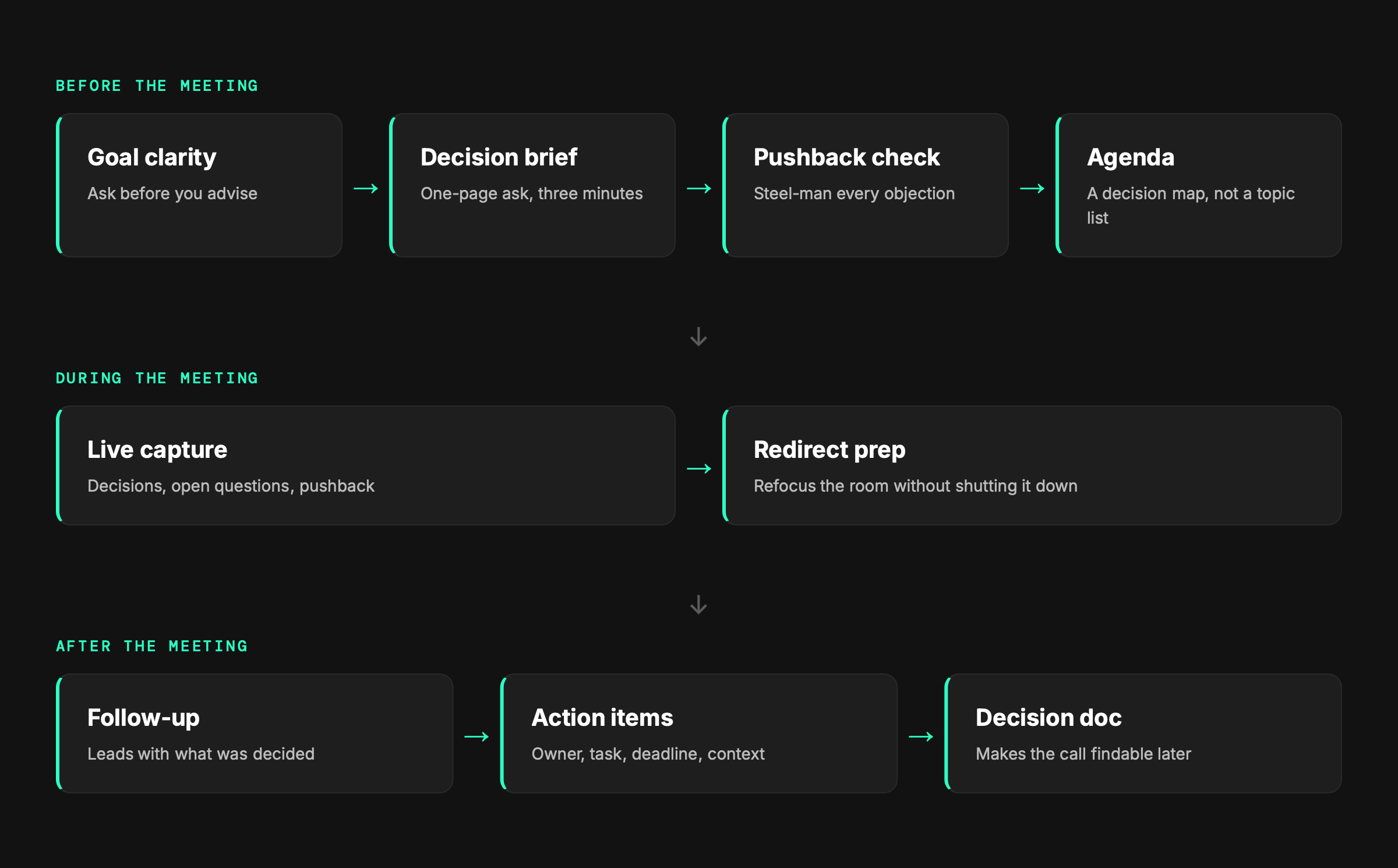
The meeting design workflow flips that. You start with the goal, build the materials to support a decision, pressure-test your argument, and shape the agenda from all of that. By the time the meeting starts, you've already done the hardest thinking.
A note on confidentiality: The prompts in this section work best when you give AI real context. Before pasting anything into an AI tool, make sure you're following your organization's data handling policies. When in doubt, anonymize names, remove identifying details, and keep financials general.
Step 1: Start With the Goal, Not the Agenda
Here's a pattern that plays out constantly: someone schedules a meeting, writes an agenda that lists topics instead of outcomes, and sends it out. People show up having prepared for a conversation, not a decision. Nothing gets resolved. A follow-up gets scheduled.
The fix is deceptively simple: get clear on what you actually need to walk out of the meeting with before you do anything else.
You don't need a formal planning session to do this. A five-minute voice memo on your commute works. A quick brain dump into a notes app works. The point is to get your thinking out of your head and into a form AI can work with.
Why this works: Asking AI to interview you instead of asking it to generate output forces you to think before you build. Most people skip this step and go straight to making slides or drafting an agenda. The result is a meeting organized around information rather than a decision. This prompt slows you down for ten minutes so the next hour doesn't get wasted.
If you're in HR, this might look like building the case for a new onboarding process. In legal, it could be getting sign-off on a contract review workflow. In ops, it might be a vendor change that requires cross-functional alignment. The frame is the same regardless of function: what do people need to know, and what do you need them to decide?
Step 2: Build the Decision Package
Once you know what you need, the next problem is presentation. Not slides, necessarily -- but information packaged in a way that lets people make a fast, confident decision.
This is where most meetings quietly fail. The person running the meeting knows the situation inside and out. The people being asked to decide don't. And rather than bridging that gap, the meeting becomes an information transfer session that runs out of time before anyone gets to the actual decision.
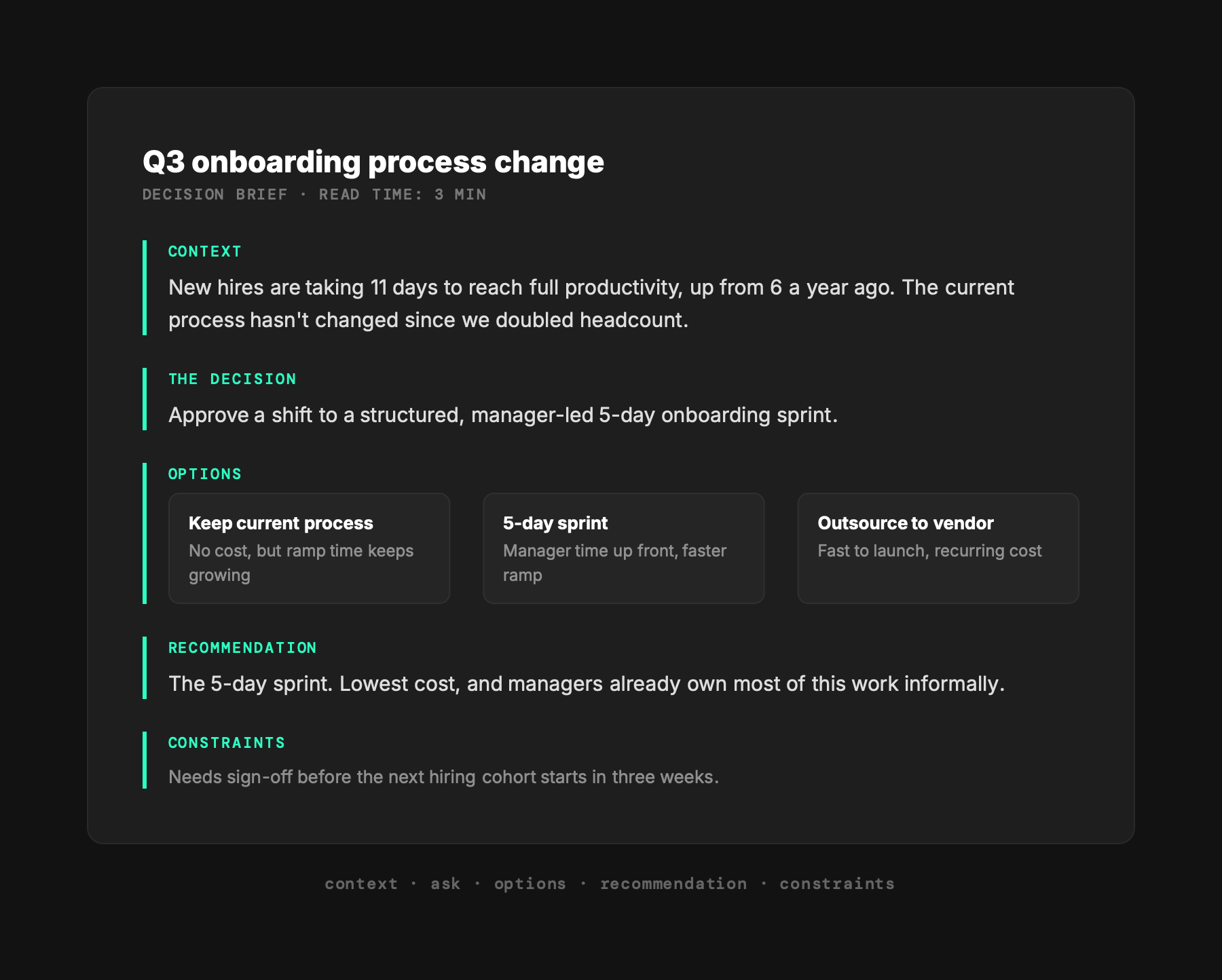
The goal here is to build a one-page decision brief: the context, the ask, the options, and the recommendation – organized so that someone can read it in three minutes and be ready to engage.
Why this works: Decision fatigue is real. When people walk into a meeting without a clear frame, they spend the first half of it getting oriented. A tight decision brief removes that tax and gets the room to the actual conversation faster. It also signals to everyone that you've done the work -- which builds credibility before you've said a word.
Step 3: Steel Man the Other Side
This is the step most people skip and the one that most often determines whether a meeting goes well.
Before you walk into a room to ask for a decision, you should know the strongest version of every objection you're likely to face. Not so you can shut them down, but so you can address them honestly and adjust your recommendation if the pushback has merit.
AI is surprisingly good at this. Give it your proposal and the people in the room, and ask it to push back as hard as it can.
Why this works: Most people prep for the meeting they want to have. This prompt forces you to prep for the meeting you might actually get. When someone raises an objection and you've already thought it through, you respond from a place of confidence instead of scrambling. And occasionally, the AI will surface a concern you hadn't considered, which is the whole point.
Step 4: Shape the Agenda and the Room
Now that you know what you need, what information supports the decision, and where pushback is likely to come from, you can build an agenda that actually serves the meeting.
You'll also have a much clearer sense of who needs to be there. Not everyone who's interested in the outcome needs to be in the room. The agenda should tell you who does.
Why this works: Most agendas are topic lists. This one is a decision map. When attendees can see the structure before they arrive, they come prepared to engage rather than orient. And when the agenda includes a clear decision moment, it's harder for the meeting to drift into an open-ended conversation that ends without resolution.
Part Two: During the Meeting
If you did the work in Part One, the meeting itself gets easier. You're not figuring out what you need in the room -- you already know. Your job during the meeting is to stay present, keep the conversation on track, and capture what matters.
Stay Out of Your Own Way
The meeting design work you did before this is only useful if you don't abandon it the moment someone asks an off-topic question. The agenda you built has a decision moment in it. Protect it.
That said, meetings rarely go exactly as designed. People bring up concerns you didn't anticipate. The conversation goes sideways. Someone senior in the room reframes the whole thing in the first five minutes.
The most useful thing you can do during a meeting is capture everything – not just decisions, but the questions that didn't get answered, the concerns that surfaced, and the moments where the room seemed to shift. That's the raw material for everything that comes after.
Why this works: Most meeting notes are either too detailed (a transcript nobody reads) or too sparse (three bullet points that mean nothing a week later). A structured capture template focuses your attention on the things that matter downstream: decisions and open loops. Everything else is context.
When the Room Goes Sideways
Sometimes the meeting drifts. Someone raises a concern that derails the agenda. A sidebar conversation takes over. The decision you came to make suddenly feels like the wrong question.
You won't be able to use AI in real time for this, but you can prep a redirect move in advance. Ask AI before the meeting to help you identify two or three ways to bring the conversation back to the decision without dismissing the concern.
Why this works: Having a redirect move prepared means you're not improvising under pressure. When someone raises a concern you've already thought through, you can acknowledge it genuinely and move forward – instead of getting pulled into a twenty-minute detour.
Part Three: After the Meeting
This is where the work you did before the meeting pays off. If you went in with a clear goal and a decision brief, turning the meeting into useful outputs is straightforward. If you did not, this part is a lot harder.
The after is also where most people drop the ball. The follow-up email goes out two days late and says something like great discussion today, here are the next steps -- with a list that nobody looks at again. Nothing closes. The meeting that was supposed to move something forward becomes one more item in a chain of unresolved threads.
Three things should come out of every high-stakes meeting: a clean follow-up, a set of action items with real accountability, and for the bigger decisions, a document that makes the decision durable.
The Follow-Up That Closes the Loop
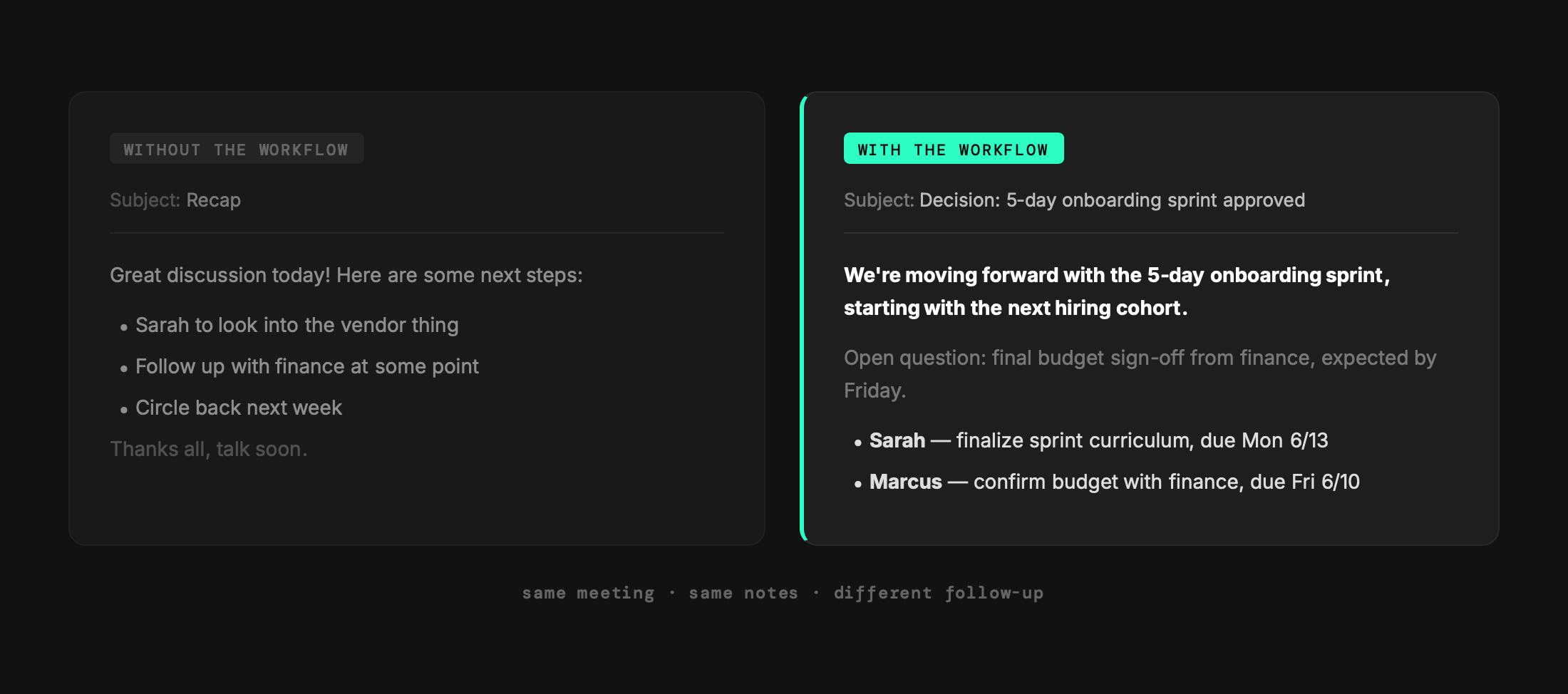
A follow-up email is not a summary. It is a record of what was decided and a handoff to what happens next. The difference matters.
Paste your meeting notes into AI and ask it to build the follow-up for you. This only works if your notes have the right raw material -- which is why the capture template from Part Two exists.
MEETING FOLLOW-UP PROMPT
Why this works: Most follow-up emails bury the decision in the middle or leave it out entirely. Leading with what was decided -- or explicitly noting that a decision was not reached -- creates clarity immediately and sets up accountability for what comes next.
Action Items People Will Actually Act On
The difference between an action item and a vague next step is specificity. Sarah to review the proposal is not an action item. Sarah to review the vendor proposal and send back a go/no-go by Friday EOD is.
AI can help you turn messy notes into properly formed action items -- but you need to give it enough to work with.
ACTION ITEMS PROMPT
Why this works: Vague action items are everyone's responsibility, which means they are nobody's. The format here forces specificity on three dimensions: who, what, and when. The context field is the one most people skip -- but it is what gives someone a reason to actually follow through, especially if they are doing it for someone else.
The Decision Document
For high-stakes meetings -- the ones where a real decision was made -- a brief decision document is worth the extra ten minutes it takes to create. It is the difference between I thought we decided X and here is what we decided, why, and who signed off.
This does not need to be a formal document. A shared note, a concise email thread, or a section in a project doc works fine. What matters is that it exists somewhere findable.
Why this works: Decisions fade. People remember the conversation differently. Six months later, someone will ask why you went this direction, and if the answer lives only in memory or a buried email thread, you will have to reconstruct it. A one-page decision doc takes ten minutes to create and can save hours of revisiting settled ground.
The Meeting That Was Always Worth Having
Here is the thing about all of this: none of it is actually about AI.
What the meeting design workflow does is force you to answer questions that should have been answered before every important meeting -- but rarely are. What are we here to decide? Who needs to be in the room? What does the person being asked to approve this actually need to feel confident saying yes?
AI just makes it fast enough that you will actually do it. The ten minutes you spend on a goal clarity prompt before a meeting is not extra work. It is the work that makes the meeting itself shorter, cleaner, and more likely to produce something you can act on.
The people who run great meetings are not the ones with the best decks. They are the ones who knew what they needed before they walked in the door.
Full Transparency - This Is A Lot of Work
All the AI in the world isn't going to immediately change how people you have no control over show up for meetings. You can spend all the time preparing, sending pre-reads and tagging people to make it clear who is responsible for next steps and you'll still end up with unnecessary meetings.
So my tip? Start with the things that make your life easier. Whether it's starting with a clearer agenda, creating a better decision document or just organizing your meetings more effectively. Adopt this at your own pace and in your own way and there will be a difference in your meetings.
Up Next: Part 3 - The Writing Grind
If meetings are where decisions get made, the writing grind is where they get communicated. Part 3 covers the emails nobody wants to write, the status updates that actually get read, and how to give feedback without spending an hour on word choice. It is the part of the workday most people would happily hand off.