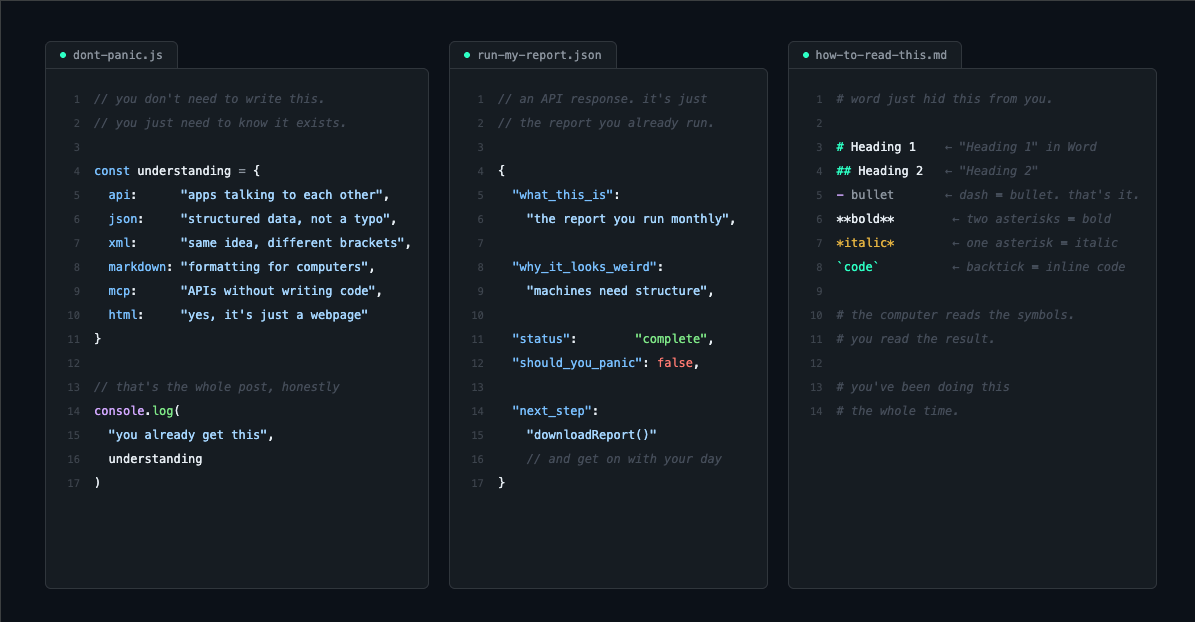
By now, you’ve probably heard a steady stream of tech jargon throwing off your daily rhythm. Terms like API, MCP, JSON, XML, and Markdown are flying around the office watercooler, Slack channels, and Zoom calls.
These concepts aren't actually new—they’ve existed under the hood of enterprise software for decades. The difference? Before consumer and enterprise AI tools became a staple of our workdays, you didn't really have to care about them. IT handled it behind the scenes.
But with AI rapidly embedding itself into our regular workflows, the line between "business user" and "developer" is blurring. Some all-star in your department brags about building a "dynamic HTML dashboard" over the weekend, or someone in finance mentions leveraging "reporting APIs to automate how we pull data," and suddenly you're left staring at your screen wondering... what?
If you’ve felt that wave of tech-anxiety, welcome to the club. I was in the exact same boat. But after willingly (and let’s be honest, sometimes unwillingly) putting myself through the ringer to figure these things out, I can confidently tell you: you don't need to learn to code to get this. You just need to understand what these terms mean for your day-to-day productivity, when you’ll encounter them, and how to use them to work smarter.
Let’s break down the plumbing of the modern office.
APIs: How Machines Talk to Each Other
Think about how you collaborate with your colleagues. You use Slack, Microsoft Teams, or email. You rely on unstructured human language to request a file, ask a question, or send an update.
But what happens when you want to get two different software applications to talk to one another?
If computers tried to communicate using our unstructured language—complete with typos, abbreviations, and informal slang—the system would crash instantly. That’s why we use an API (Application Programming Interface). An API is simply a highly structured, strictly defined way to get data safely in and out of an application.
Let's look at a standard corporate reporting process as an example. Regardless of the software platform your company uses, chances are its core features are broken down into specific, task-oriented APIs:
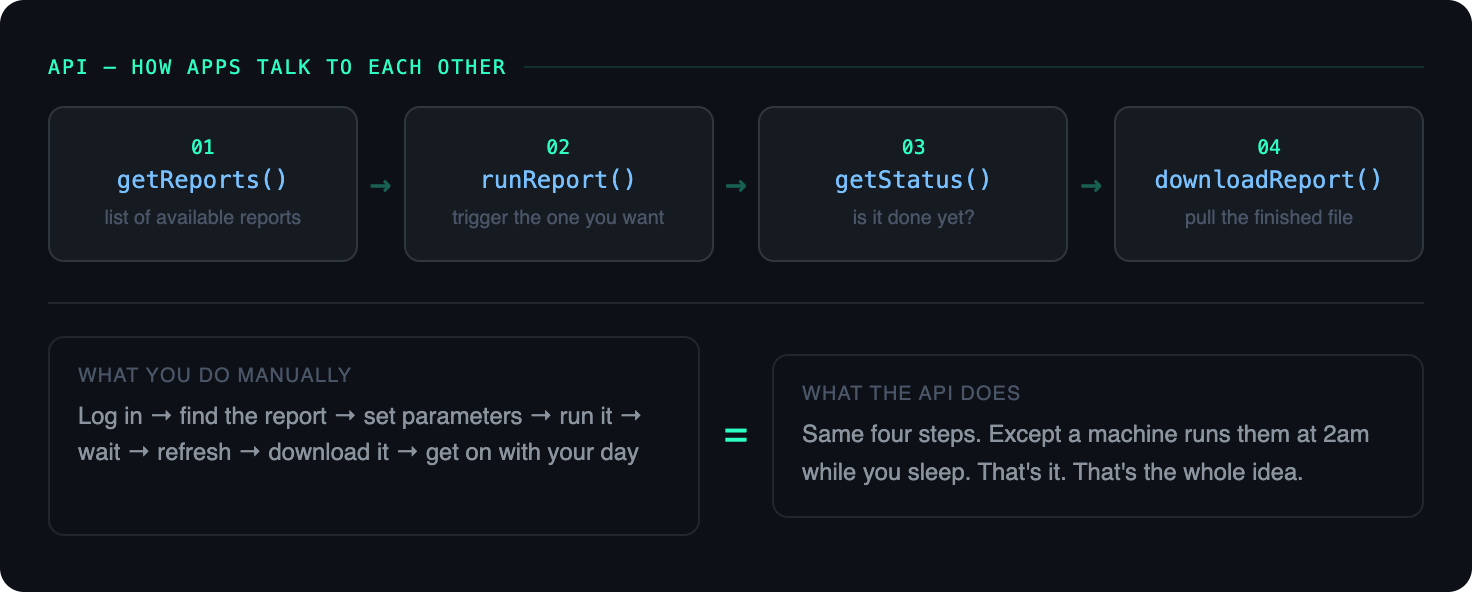
getReports— Requests a full list of report templates available to you.runReports— Triggers the specific report you want with your defined parameters.getStatus— Checks whether the system has finished compiling the data.downloadReport— Safely extracts the final data file to your machine.
Notice something familiar? These steps aren't doing anything magically new. They perfectly mirror your manual daily workflow: you log into the system, go to your list of reports, pick one, change some parameters, hit run, click refresh until it’s ready, and finally download it.
The real magic happens because a machine is executing these steps via an API. Because it's structured, you can automate it. You can schedule heavy reports to run at 2:00 AM so the clean data is sitting ready for you the moment you log on, eliminating the morning bottleneck entirely.
Your 9-to-5 Takeaway: If you interact with software daily and want to automate a repetitive task, search Google for"[Your Application Name] available APIs"or"[Your Application Name] developer portal."Just reviewing what commands are exposed to the public is the first step toward understanding what you can hand off to a machine.
JSON and XML: The Languages of Data
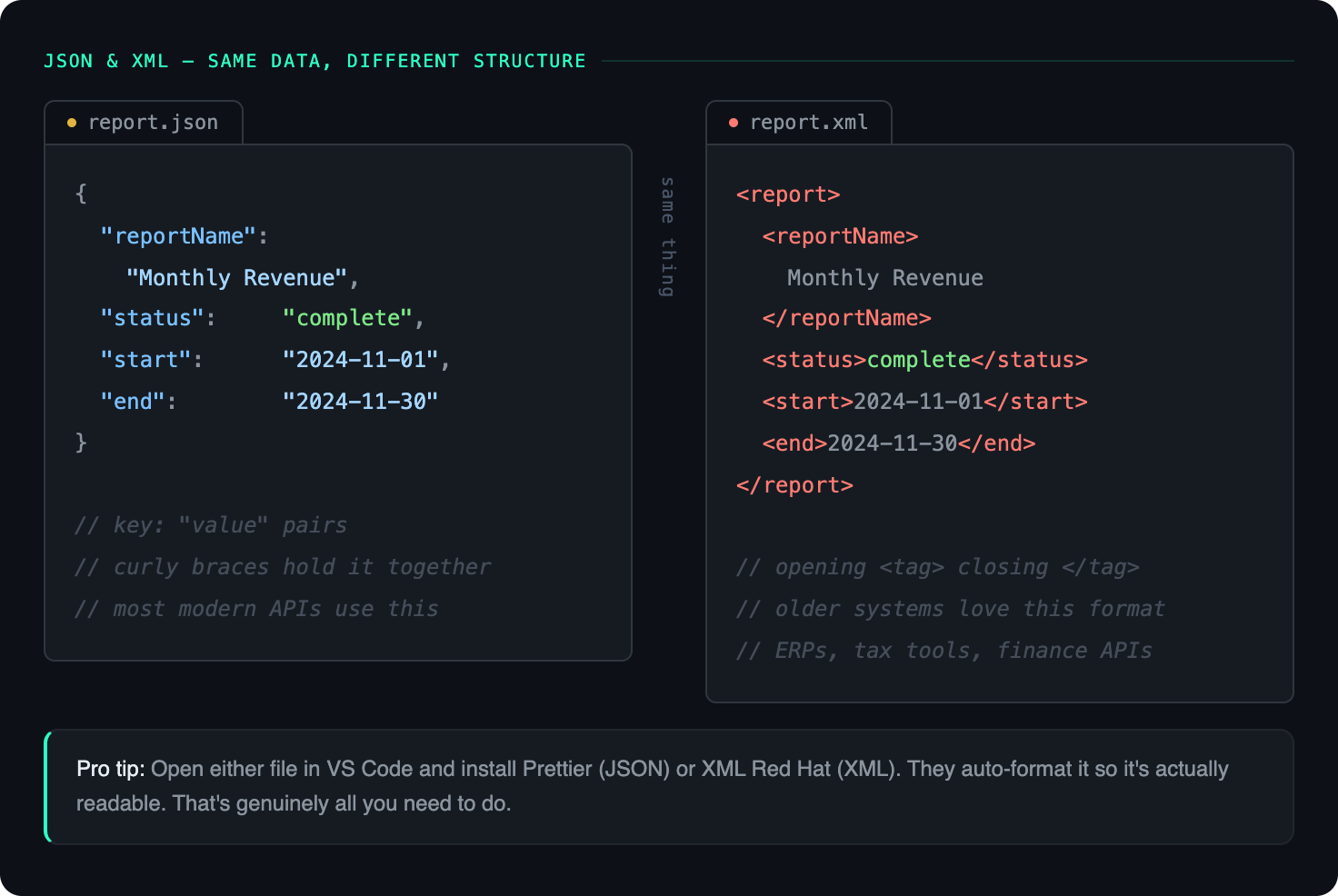
A natural follow-up to APIs are JSON and XML. If an API is the telephone line connecting two applications, JSON and XML are the actual structured languages being spoken over the wire.
Because machines require perfect consistency, they don't pass data back and forth in a messy Word document or a loose Excel sheet. They use specific file formats designed to be lightweight, organized, and easily read by databases and AI models.
Depending on the age of the application you are querying, your data will usually arrive in one of two formats:
The JSON Format
JSON (JavaScript Object Notation) uses curly braces and clear key-value pairs. It’s clean, modern, and the preferred format for nearly all consumer and enterprise generative AI tools:
JSON
{
  "reportId": "RPT-2024-11",
  "reportName": "Monthly Revenue Summary",
  "dateRange": {
    "start": "2024-11-01",
    "end": "2024-11-30"
  },
  "status": "complete",
  "downloadUrl": "/reports/download/RPT-2024-11"
}
The XML Format
XML (eXtensible Markup Language) uses nested tags, similar to website code. It's a bit older but still heavily used in enterprise legacy systems, shipping logistics, and tax compliance platforms:
XML
<report>
  <reportId>RPT-2024-11</reportId>
  <reportName>Monthly Revenue Summary</reportName>
  <dateRange>
    <start>2024-11-01</start>
    <end>2024-11-30</end>
  </dateRange>
  <status>complete</status>
  <downloadUrl>/reports/download/RPT-2024-11</downloadUrl>
</report>
If you open a JSON or XML file in regular Windows Notepad or Microsoft Word, it looks like an unreadable, jumbled wall of text.
To handle these without crossing over into deep developer territory, all you need is a free application called Visual Studio Code (VS Code). While it is technically a code editor, think of it simply as a superpowered text editor built for the modern office.
By opening JSON or XML files in VS Code and installing a free, one-click extension like Prettier or XML Redhat, the software will automatically align, color-code, and format the data to make it entirely human-readable. Once you look at a few of these properly formatted files, you'll see that it isn't wizardry—it’s just highly organized data.
HTML: The Digital Dashboard Revival
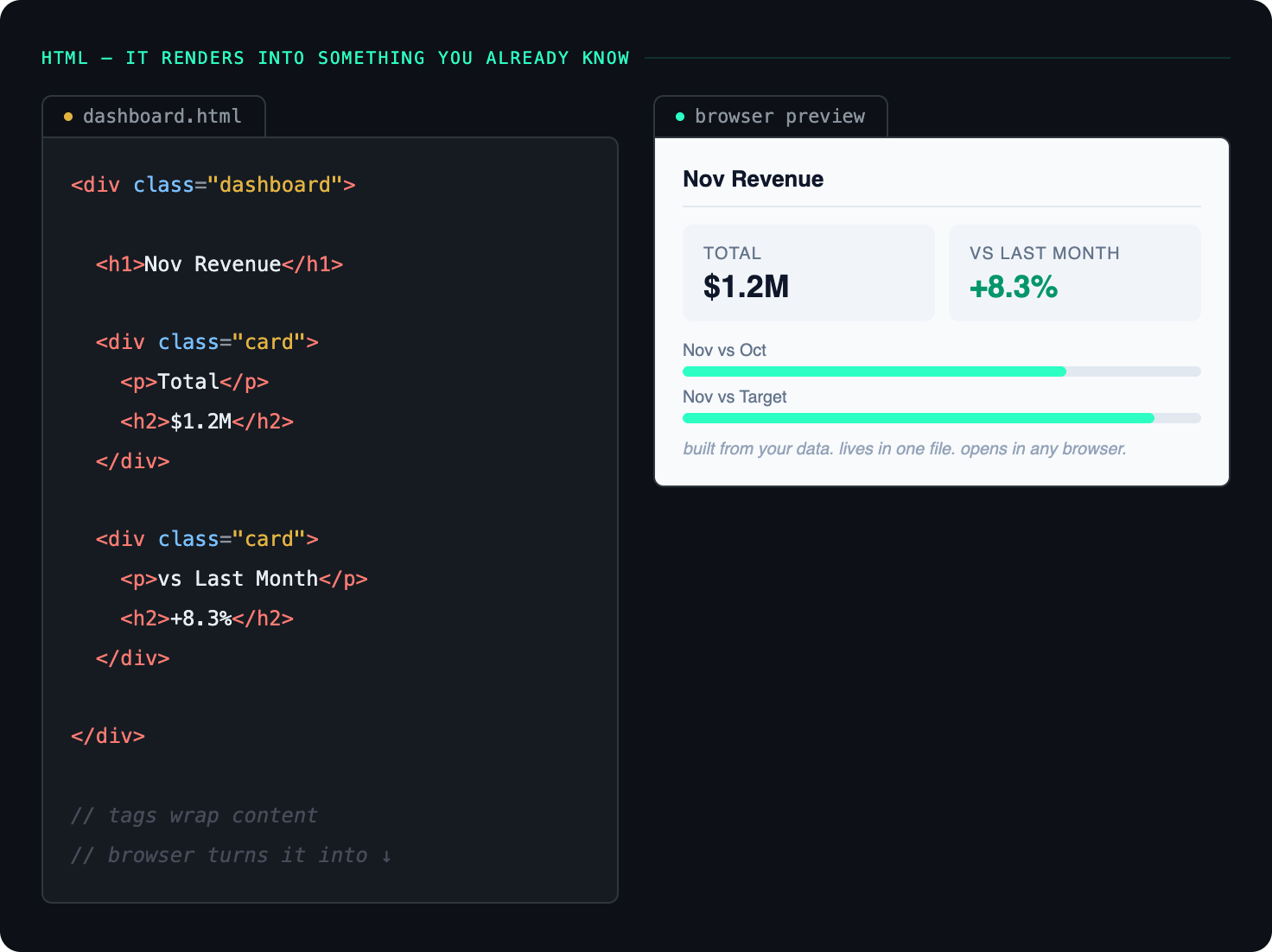
Hearing people talk about HTML can feel like a massive throwback to the mid-2000s when everyone was trying to figure out basic code to customize their MySpace profiles.
HTML (HyperText Markup Language) is the baseline language used to build websites. Lately, a fascinating practice has caught on in corporate spaces: professionals are using AI tools to build custom, localized "personal dashboards" to track their projects, metrics, or daily tasks.
When an all-star colleague shows off a sleek, custom visual workspace they created over a weekend, it's easy to feel intimidated. In reality, most of these are single, static HTML files generated entirely by an AI prompt.
While these personal dashboards are incredibly helpful stepping stones, it’s important to understand what they are. A static HTML page is just a display layer. True enterprise software innovation happens when those raw layout ideas are connected to backend databases and external integrations via the APIs we just discussed.
But if you are just trying to get your feet wet with "vibe-coding" (building things simply by describing them to an AI), you can create your own tracking dashboard today. Try jumping into your AI tool of choice and using a prompt like this:
Save that output as a .html file, double-click it to open it in your browser, and you'll immediately see how accessible building your own interfaces has become.
Markdown Files: The Logic of Formatting
Oh boy, is everyone getting crazy with Markdown files lately. If you look around the AI landscape right now, you'll see custom prompts, AI agent instructions, system personas, and .md documentation files (like CLAUDE.md) absolutely everywhere. Seeing these files pop up in everyday shared folders is the exact moment I realized AI was moving deep downstream into standard corporate operations.
Don't let Markdown files intimidate you. Markdown is really just a plain text file format, but it embeds structural formatting directly into the document text using simple symbols.
We actually deal with Markdown logic all the time; it’s just that we are used to interacting with a polished, fully rendered version. Think about how you style a document in Microsoft Word. You highlight text and click "Heading 1" or "Heading 2" from a menu. A computer, however, can't interpret those visual font changes if you copy-paste raw text—it just sees a flat wall of words. It needs markers to understand hierarchy.
Here is how a standard Standard Operating Procedure (SOP) for running a report looks in its raw Markdown state versus how a computer or markdown viewer automatically displays it to a human:
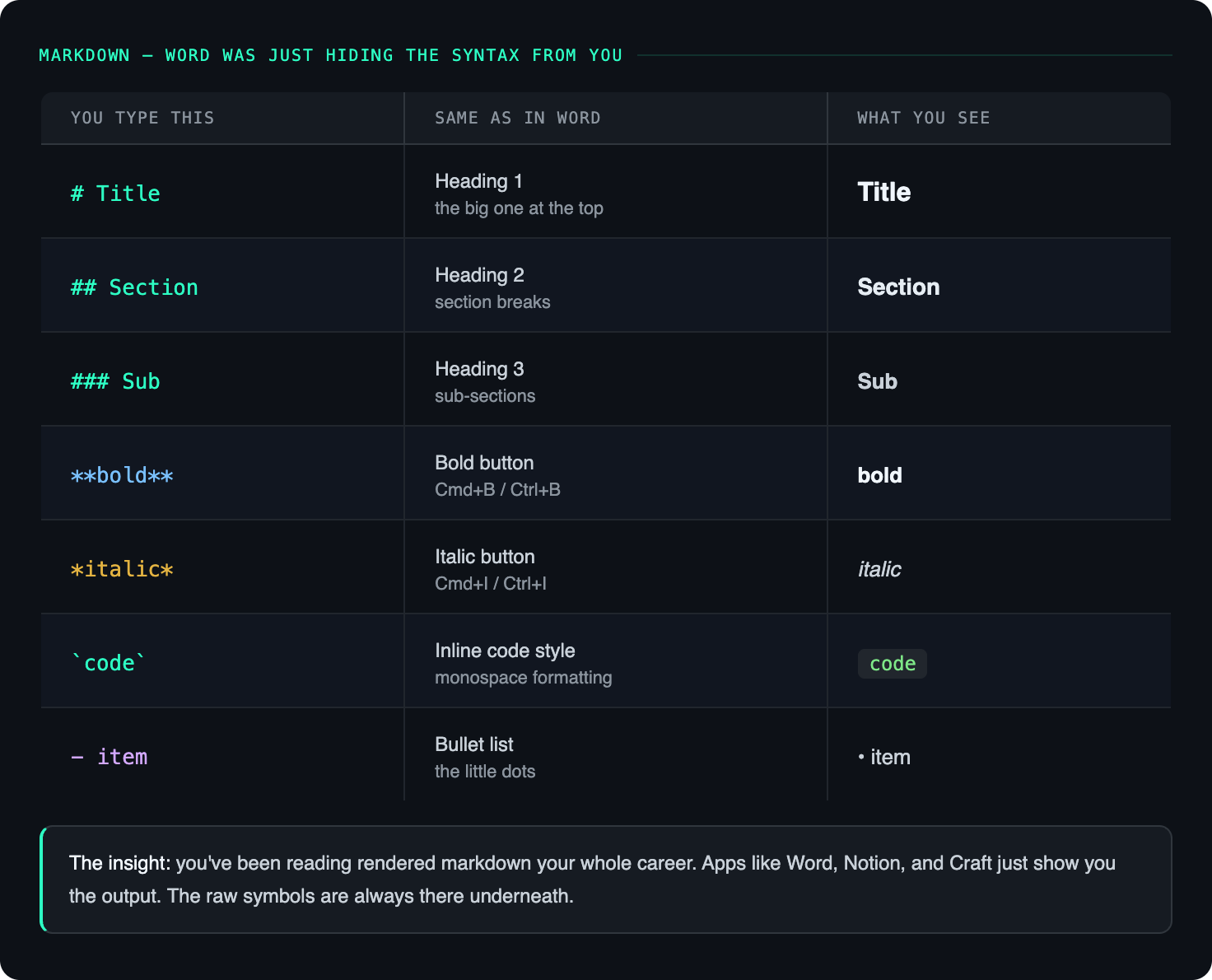
In reality, Markdown acts as a lightweight translation language so that computers can instantly understand structure, formatting, bullet points, and code blocks. Because LLMs natively speak and write in Markdown, it has quickly become the gold standard language for interacting with AI systems.
Personally, I use Markdown every single day in applications like Craft to write out content drafts, and it’s the native foundation of personal knowledge management tools like Obsidian. It is an incredibly fast, mouse-free way to write structured notes. But remember: as long as you know what it is, you don't need to memorize the rules. You can always ask your AI tool of choice to convert any text, document, or outline into Markdown whenever a system requires it.
MCP Servers: The Ultimate AI Bridge
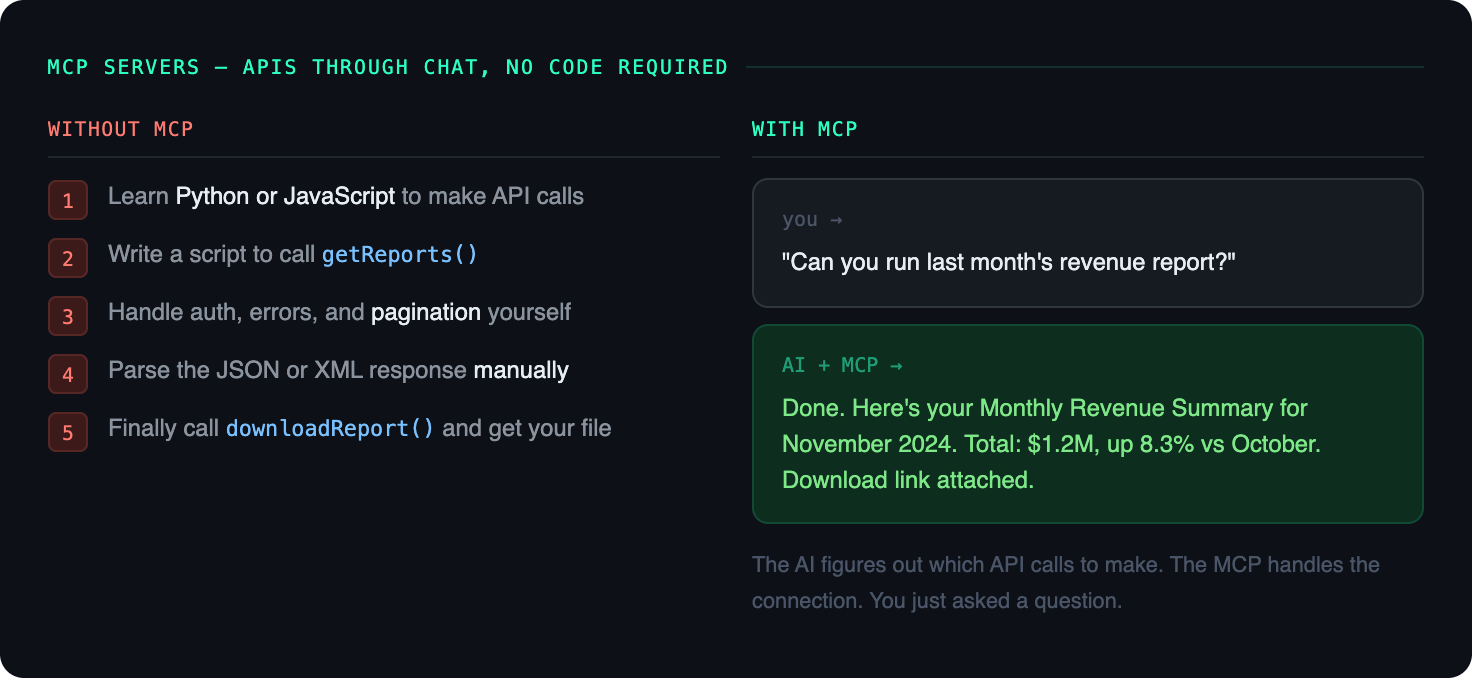
As we move toward an ecosystem dominated by autonomous AI agents, Model Context Protocol (MCP) servers are becoming the hottest topic in workplace productivity.
Why? Because MCP servers allow you to interact with all those complex application APIs we discussed earlier without you having to understand or manage code, connections, or data parsing.
Before MCP existed, if you wanted an AI tool to interact with your reporting software, you had to cross deep into developer territory. You had to learn Python or JavaScript, or leverage complex, expensive enterprise middleware (ETL tools) to build API requests and manually parse the responses.
MCP completely flips the script by allowing your AI tool to interact with APIs using standard, conversational chat.
Instead of creating intricate scripts or multi-step workflows to touch four different systems just to run a report, you can connect your AI tool of choice (like Claude, ChatGPT Enterprise, or Gemini) to an MCP server and simply ask:
"Hey, can you pull the regional sales report for last month and highlight the top three outliers?"
The AI tool works in tandem with the MCP server to instantly determine what values the application's underlying API needs, sends the request automatically behind the scenes, reads the raw JSON or XML response, and gives you a perfectly formatted answer in plain English. It is the ultimate bridge between human intent and machine execution.
If you're just starting out, you don't need to worry about building an MCP server from scratch. Simply understanding what it is and how it functions gives you the leverage to suggest innovative automation ideas during your team’s next strategic planning session.
The Big Picture
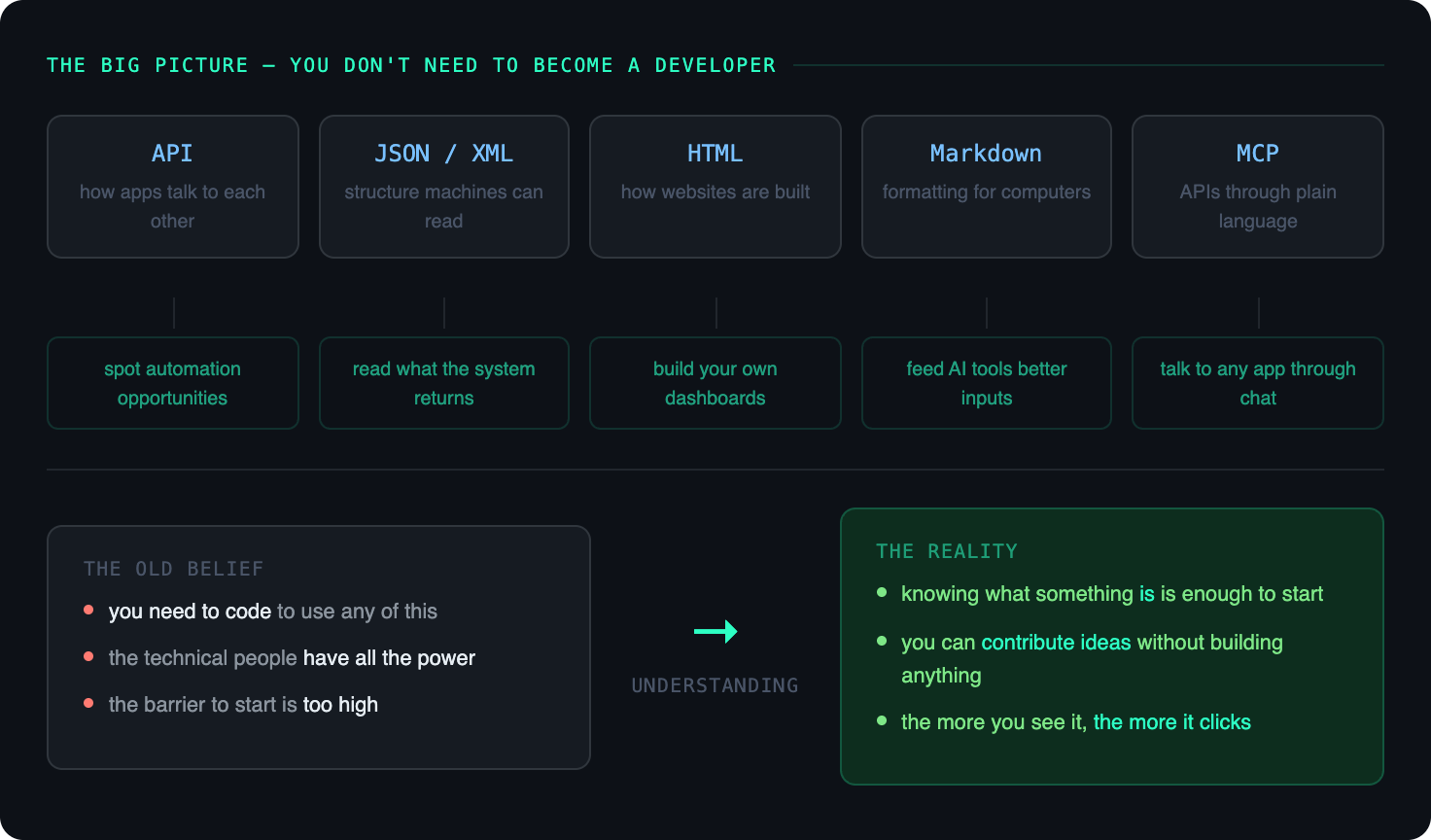
The sheer volume of tech buzzwords coming out right now can easily make you feel like you're being left behind or that the barrier to entry is far too high.
But as you can see, once you strip away the acronyms and look at the underlying fundamentals, it's all just digital plumbing. APIs are the pipes, JSON and XML are the data flowing through them, Markdown is the structural framing, HTML is the bucket that displays it visually, and MCP is the smart valve making it effortless to manage through conversation.
You don't need to change careers and become a software engineer. By building up your technical literacy and understanding how these pieces fit together, you shift your role from a passive user to an architect of your own workflow.
Take it one small step at a time, experiment with existing tools, and don't be afraid to pull back the curtain to see how the software you use every day actually works. The more you look under the hood, the easier it gets!